RFID Reader
- 0.0
- Rating
- 10.00K
- Installs
- Free
- Price
 Analysis by App-foxy
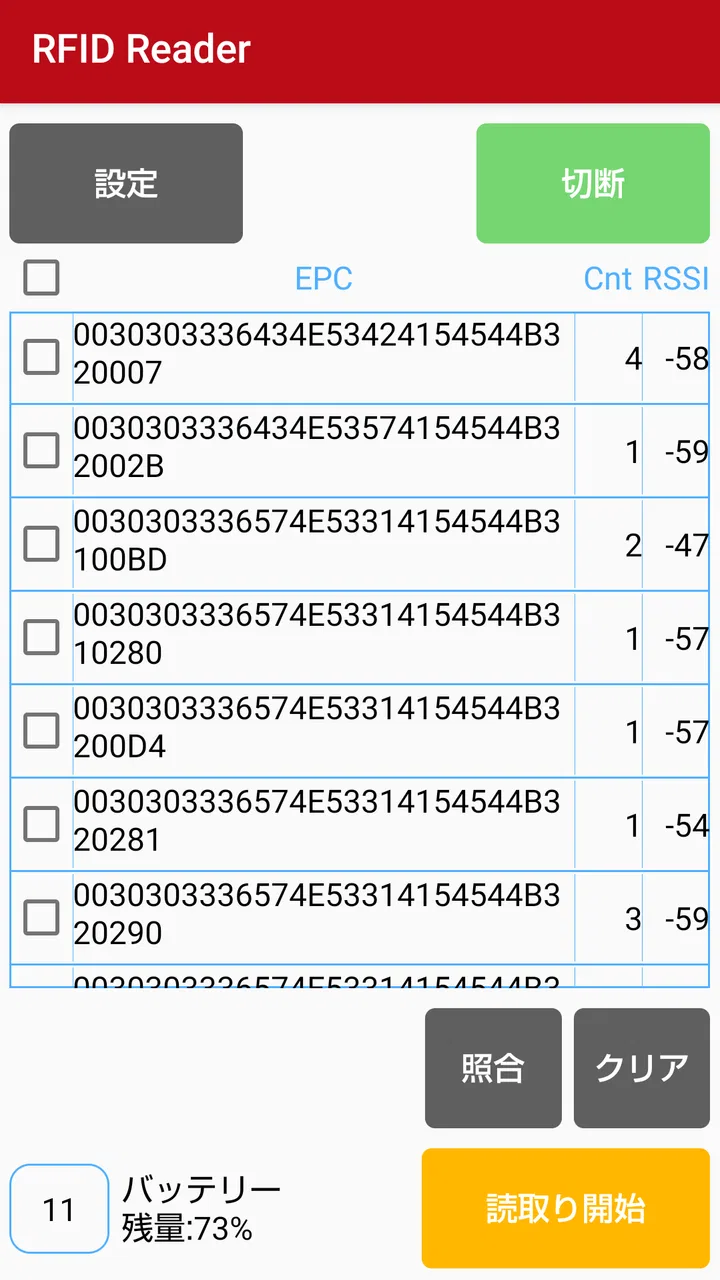
Reading an RFID tag sounds simple until you need to choose the right reader, the right app, and a workflow that does not create more work than it saves. I tested RFID Reader with that practical question in mind: is it a useful companion for the small RFID reader made by Toppan Forms Co., Ltd., or is it too narrow for everyday use? My conclusion is fairly clear. This is a focused utility for people who already have the matching hardware and want a straightforward way to read tags on a compatible Android device. It is not a general-purpose scanner, a full inventory platform, or a replacement for every NFC-related tool.
The app is published by TOPPAN Inc. and sits in the Libraries & Demo section of Android software. It is free to install, rated for Everyone, and supports devices running Android 7.1 or later. That combination makes it approachable from a compatibility and cost perspective, but the important buying decision is not the app price. The real question is whether your work, study, demonstration, or personal project already revolves around the small RFID reader it is designed to use.
How I would decide whether it fits
I would begin with the hardware, not the download button. The store description identifies this application as a reader for the small RFID reader manufactured by Toppan Forms Co., Ltd. That wording matters because it sets the boundaries of the experience. Installing the application on a phone does not, by itself, turn the phone into a universal RFID reader. You need the intended external reader and a tag setup that works with it.
You May Also Like

 AccuWeather: Weather Radar
AccuWeather Review: A Quick, Clear Forecast for Everyday Decisions
For everyday plans, the best forecast is the one you can understand quickly. AccuWeather makes rain timing, radar, and local conditions easy to act on, with a few trade-offs.

 Hill Climb Racing
Why Hill Climb Racing Still Turns Crashes Into One More Run
A tiny car, a bumpy hill and one more upgrade: Hill Climb Racing keeps resurfacing because its simple chaos makes every near-miss feel personal.

 AliExpress - Shopping App
AliExpress Makes Global Shopping Feel Personal, but Shoppers Bear the Risk
AliExpress turns a global marketplace into a pocket-sized discovery engine. Its reach is useful, its shopping loop compelling, and its trade-offs easy to miss.

 Lords Mobile: Kingdom Wars
Lords Mobile Is a Kingdom-Building Routine, Not a Quick Match
A case-by-case verdict on the building, battles, device demands, and social commitments that make Lords Mobile rewarding for some players and exhausting for others.

 PDF Scanner app - TapScanner
TapScanner Makes Paperwork Easier to Capture, Check, and Share
TapScanner makes scanning with a phone feel less like a rescue operation and more like a dependable step in getting work done. Its capture tools are useful, though not flawless.

 Block Blast!
 Shows How Much a Puzzle Game Can Leave Out
A quiet grid game shows why puzzle players increasingly value instant clarity, repeatable skill and low-pressure play—and where the genre still needs to catch up.
More From Our News Desk
View All News


For me, the first decision criterion is therefore ownership or planned access to that accessory. If you are evaluating RFID for a classroom demonstration, a product prototype, a small internal process, or a controlled test, the pairing can make sense. If you simply want to tap transit cards, read ordinary NFC labels, or identify any nearby wireless tag, I would look at a different kind of tool instead. A phone’s built-in NFC functions and a dedicated inventory system solve different problems.
The second criterion is simplicity. A narrowly designed companion app can be an advantage when you do not want a large platform with accounts, dashboards, exports, and business administration. It can also be a limitation if you expect those things. In my view, this application is best judged as the operating surface for a specific reader, rather than as a complete RFID management solution.
The third criterion is the setting in which you will use it. A quick demonstration has different needs from repeated warehouse work. In a demonstration, the value is seeing a tag read clearly and explaining the result. In a recurring process, you need to think about how results will be recorded, checked, shared, and recovered if a scan fails. The app may be a useful first layer, but I would not choose it alone for a workflow that depends on detailed stock control or audit history.
There is also a practical device question. Android support begins with version 7.1, so older compatible phones are not automatically excluded. That is helpful if you have a spare handset available for a test bench or teaching station. Still, I would use a device that is comfortable to hold near the reader and that can remain dedicated to the task. The best experience with a focused hardware companion usually comes from reducing distractions and keeping the setup consistent.
What the first session feels like
My recommended first session is deliberately small. Install the app, connect or position the intended small RFID reader as instructed by its hardware documentation, and test with one known tag before attempting a batch. This approach separates three possible problems: the phone, the reader, and the tag. If you begin with a box of unidentified items, a failed result tells you very little.
I would also keep a short written note of the test conditions. Record which tag you used, where it was placed, and what you expected to happen. That may sound excessive for a simple reader, but it is one of the most useful habits when working with radio-based identification. A tag can be present without being read reliably, and changing distance, orientation, or surrounding material can alter the result. The note gives you a repeatable baseline instead of relying on memory.
One non-obvious benefit of this approach is that it turns the app into a diagnostic aid. Even if the software only serves a focused reading task, a stable test sequence helps you discover whether the issue is a loose connection, an unsuitable tag position, or an assumption about what the reader can detect. I would not treat every unsuccessful scan as an application failure.
Where the focused design works well
The strongest part of RFID Reader is its narrow purpose. When an app is meant to work with one small reader, there is less reason to search through unrelated tools or configure a broad collection of protocols. For a person who needs to demonstrate the basic idea of RFID, that focus can make the setup easier to explain: place the tag near the reader, observe the reading, and connect the result to the physical object.
I can see a useful everyday scenario in a small workshop or training room. Imagine preparing labeled samples for a lesson about identification technology. Instead of asking students to interact with a complicated business system, you can let them handle a tag and see how the external reader and Android device work together. The app is appropriate for that kind of controlled learning because the hardware relationship is visible and the task stays understandable.
It can also help during early prototyping. If I were testing whether tagged objects could be recognized in a proposed process, I would prefer to validate the physical reading step before investing in a larger software system. This application can serve as a low-cost starting point because it is free and designed around the reader rather than wrapped in a larger service.
That does not mean it replaces a prototype application. The useful insight is that it can help answer an earlier question: can the tag and reader combination produce a usable reading in the intended environment? Once that is known, a developer or process owner can decide whether a custom interface, database, or inventory tool is worth building.
Another strength is accessibility at the entry level. The Everyone age rating makes it suitable for general audiences, and the minimum operating-system requirement is not unusually demanding for an Android utility. I would still keep the user’s actual phone model and the reader connection in mind, but the basic software barrier is low.
Small habits that make testing more reliable
I would avoid testing directly beside a pile of other tags. When several tags are close together, you may not know which one produced the reading or whether the reader handled more than one at a time. Start with a single tag, then add another only after the first result is repeatable. This is especially important when you are explaining the system to someone else, because a confusing demonstration can make reliable technology look unpredictable.
Positioning is another practical detail. Keep the tag and reader in the same arrangement during early checks. Move the tag gradually rather than waving it around. If the result changes, you will learn something about the usable reading area. That information is more valuable than a single successful scan because it tells you how the setup might behave when a person is working quickly.
I would also separate identification from record keeping. Use the app to establish that a tag can be read, then decide how you will document the result. A paper checklist may be enough for a short demonstration; a separate spreadsheet or custom system may be better for a pilot. Treating those as separate layers prevents you from expecting a compact reader companion to become a complete data-management product.
Finally, keep the hardware and phone together as a named kit if several people share them. This is a simple operational improvement, but it reduces the chance that someone installs the app on a different phone and assumes every reader or tag will behave identically. A consistent kit makes troubleshooting faster and makes demonstrations less stressful.
When another category is the better choice
The usual alternatives fall into several categories, and each one answers a different need. A phone’s built-in NFC utility is the obvious choice for casual contactless interactions when the phone already contains the required reader technology. That route is more convenient if you do not own the Toppan Forms small RFID reader. However, convenience does not make it equivalent to this app’s intended hardware arrangement, so I would not switch between the two casually and expect identical results.
A dedicated RFID inventory application is a better direction when the main job is managing many tagged items over time. Such software is normally chosen for workflows involving item records, locations, counts, user roles, or reporting. I am not treating those as features of this app; they are simply the reasons someone might need a different category. If your success depends on a searchable history rather than a clear reading during a test, a larger system will probably fit better.
A custom developer tool may also be preferable when RFID reading is only one step inside a larger process. For example, a company might need to connect a tag event to an internal database or trigger a specific action. In that situation, a companion reader app can be useful during hardware validation, but it is unlikely to be the final interface unless it already matches the required workflow.
There is a trade-off here that is easy to miss. Choosing a broader alternative may give you more control, but it also introduces more setup, more training, and more places for a process to fail. Choosing this focused app may reduce the initial complexity while leaving you to handle documentation elsewhere. I would select based on the cost of that missing layer, not on the number of buttons visible in a competing application.
I would skip this app if my only goal were to read ordinary tags with the phone itself, if I needed a cross-platform workflow, or if I wanted a polished stock-management environment from the first launch. I would also hesitate if the reader is not available for repeated testing. The app’s value depends heavily on the hardware relationship, and that is not something software alone can solve.
The real cost of changing tools
Because this application is free, the financial cost of trying it is low. The more important cost is switching later. If you use it to establish a tag-reading process and then move to a larger system, you may need to repeat tests, retrain users, and redesign how readings are recorded. That is why I would define the pilot’s purpose before starting: are you proving the reader works, teaching RFID basics, or building a daily operational process?
For a short proof of concept, I would keep the scope intentionally narrow. Use a small set of known tags, define what counts as a successful reading, and write down the physical arrangement. Do not build an elaborate manual process around temporary observations. This keeps the eventual move to another tool manageable because you are preserving the important knowledge rather than creating habits that depend on undocumented steps.
For a classroom or demonstration, switching cost is even smaller. The app can remain a practical teaching aid while the lesson focuses on the relationship between a physical tag, a reader, and a digital result. If the class later needs data analysis, you can add that separately instead of forcing a simple demonstration app to carry the entire curriculum.
For a business pilot, I would be more cautious. Before making it part of a daily routine, decide who owns the readings, where results are stored, and how a failed scan is handled. If those answers require features outside the app’s focused purpose, choose the broader system early. It is cheaper to discover that mismatch during planning than after staff members have built their own workarounds.
What to expect from the current release
The current version is 1.1.build_251030. I would keep the app updated through the normal Android distribution channel, especially when the reader is important to a demonstration or test. At the same time, I would avoid updating immediately before a scheduled presentation or field trial. Test the complete phone-and-reader combination first, because the accessory is part of the experience and not merely an optional extra.
The application was released on October 8, 2020, and has passed ten thousand installs. Those details suggest that it is an established, narrowly targeted utility rather than a brand-new experiment, while the average rating shown is zero point zero. I would not use that rating alone to judge the app. For a specialized companion, the more meaningful test is whether it works with the exact reader and tag setup you intend to use.
That is also why I would be careful when recommending it to a friend. I would not say, “Install this and it will read anything.” I would say, “If you have the small Toppan Forms reader, this free app is a sensible place to begin.” That wording is less exciting, but it is much more accurate and prevents the most common disappointment: expecting a general scanner from a hardware-specific companion.
The key trade-off is focus versus completeness. You gain a direct route to testing the intended reader, but you should not assume that a direct reading automatically becomes an organized inventory record. Once you understand that boundary, the app becomes easier to evaluate fairly.
My recommendation for different users
I recommend it to owners of the compatible small RFID reader who want a simple Android-based way to test tags, demonstrate RFID, or validate an early physical workflow. It is also a reasonable choice for schools, hobby projects, and small technical trials where the goal is to observe the reading step without paying for a larger platform.
I would recommend a structured test before relying on it in a recurring process. Use one known tag, confirm the reader connection, repeat the same movement, and decide how the result will be recorded outside the reading moment. If that process feels sufficient, the app may be exactly as focused as you need.
I would point someone toward a phone-native NFC tool when they do not have the intended external reader. I would suggest dedicated inventory software when they need a history of items and operational reporting. I would suggest a custom solution when the tag event must feed directly into an existing application. Those are not criticisms of this app; they are signs that the underlying job has grown beyond its simple companion role.
For my own decision, I would keep RFID Reader installed on a dedicated Android device if I were running demonstrations or hardware tests with the compatible reader. Its free price and Everyone rating make experimentation easy, and support for Android 7.1 or later helps keep older spare devices useful. I would not make it the center of a complex inventory operation without first proving that the surrounding manual or custom process is acceptable.
In the end, this is a sensible tool when the question is “Can this Toppan Forms reader read my tags in this setup?” It is a poor fit when the question is “Which complete RFID platform should run my organization?” I like it precisely because it does not need to pretend to be the second thing. For the right hardware owner, it offers a direct, low-cost starting point; for everyone else, choosing a different category will save time.
FAQs for RFID Reader
01What is the RFID Reader app used for?
The RFID Reader app is designed to read and process data from RFID tags. It allows users to scan, track, and manage RFID-tagged items directly from their Android or iOS device. This capability is especially useful for inventory management, asset tracking, and data collection in various industries.
02Is the RFID Reader app compatible with all RFID tags?
The RFID Reader app is compatible with most standard RFID tags, including both passive and active types. However, compatibility may vary depending on the frequency and protocol used by the tags. It's important to check the app's specifications and supported tag types before installation.
03How does the RFID Reader app connect to RFID hardware?
The RFID Reader app connects to RFID hardware using Bluetooth or Wi-Fi, depending on the reader's capabilities. It supports seamless integration with various RFID readers, allowing users to easily manage connections and data transfers. Ensure your RFID hardware is compatible with the app for optimal performance.
04Does the RFID Reader app require an internet connection?
The RFID Reader app does not necessarily require an internet connection for basic scanning and data collection. However, for features like data synchronization, cloud storage, or updates, an internet connection is necessary. Offline usage is supported for local data handling but with limited functionalities.
05Is there a cost associated with using the RFID Reader app?
The RFID Reader app offers a free version with basic features, suitable for general RFID scanning needs. For advanced functionalities such as bulk processing, data analytics, and cloud integration, a premium version is available. Pricing details can be found within the app or on the official website.
Pros
- Easy to set up and use for beginners.
- Supports multiple RFID tag types.
- Fast and reliable scanning process.
- Compact design for portability.
- Customizable settings for various needs.
Cons
- Limited compatibility with older devices.
- Occasional connectivity issues.
- Requires frequent updates.
- Battery consumption is relatively high.
- Limited offline functionality.

RFID Reader
Gallery